Every meeting, recorded, transcribed and written up.
Notulist records your meetings, around the table or on a call, on your phone, Mac or from your browser. It knows who said what and turns it into a report you can edit, search and share.
Sign in with Microsoft, Google or Apple.
Press record. The rest happens while you talk.
- 1
Record or upload
Put your phone on the table, record in the browser, let the Mac app pick up your Teams, Zoom or Webex call, or upload a recording you already have. Audio uploads every few seconds while you record, so a crash or lost connection never costs you a meeting.
- 2
Transcribed with speakers
A timestamp on every word and a paragraph per speaker. Link speakers to people once; Notulist suggests them next time, also from your calendar invite.
- 3
Report, search, share
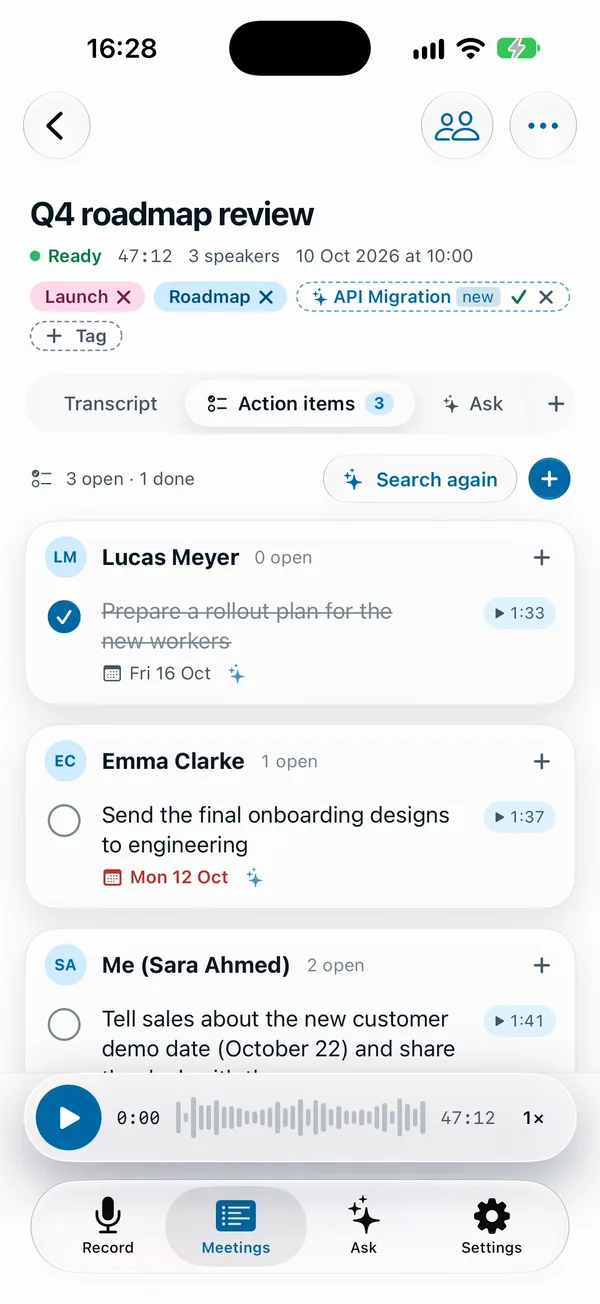
Generate a report from your own templates, edit it, tag the meeting and share it with the people who were there. Ask questions across all your meetings later.
Put your phone on the table. Notulist takes the minutes.
Plenty of meetings still happen around a table. Start a recording on your iPhone or Android phone and put it down: it keeps going with the screen locked, and the meeting on your calendar is picked for you.
- Keeps recording with the screen locked
- Pause and stop from the lock screen or the Dynamic Island
- The calendar event in progress is linked for you
- In the browser too, with recovery after a closed tab
AI-generated video
Your Mac notices the call before you do.
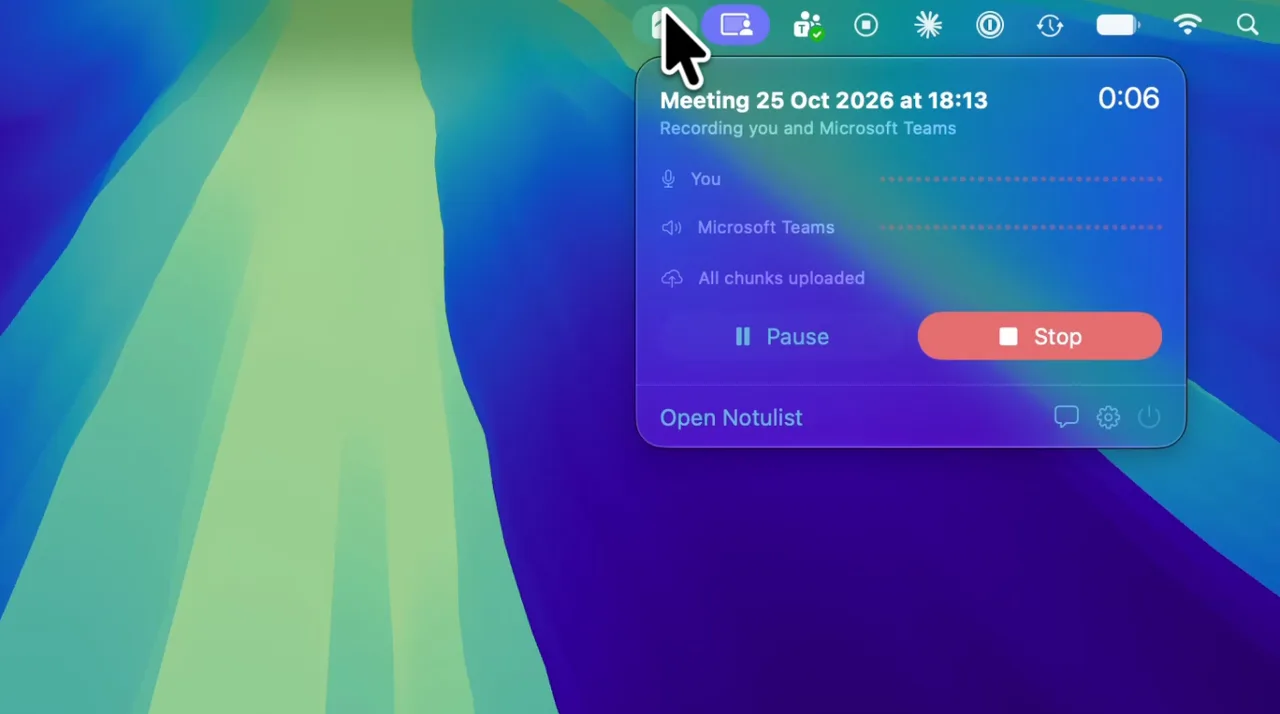
The menu bar app detects Teams, Zoom and Webex calls and asks whether to record, and stops by itself when the call ends. It captures your microphone and the call audio, so every side of the conversation ends up in the transcript.
- Asks before recording, stops when the call ends
- Your voice and everyone else on the call
- Google Meet in the browser, if you turn it on
- Also on Windows, with the Windows app
Transcripts with names, not “Speaker 2”.
Notulist splits the conversation into paragraphs per speaker, with a timestamp on every word. Link speakers to people in your own library; connect your Microsoft 365 or Google calendar and Notulist links the recording to the meeting and suggests the attendees. Your own vocabulary of names and terms is passed to the transcription, so they come out spelled right.
- Click a word to play from there
- Edit, split and merge paragraphs
- Export as TXT, Markdown, SRT or VTT
Minutes in your format, written for you.
Pick a template or write your own: decisions and action items, a client summary, notes from a one-on-one. The report streams in and you edit it like any document. Tags are suggested from the content, so your meetings stay organised without effort.
Learn moreAsk your meetings a question. Get an answer with sources.
Search every transcript and report at once, by word or by meaning, from ⌘K. Chat with one meeting, a tag, a person or everything you ever recorded; every answer points to the exact passage, and one click plays it back.
Learn moreMore features
All featuresPeople, companies, tags
Every speaker is a person in your library, grouped by company. Link a colleague to a speaker and, if you choose to share, they get read-only access to the meeting with an email. Browse by person, company or tag.
Calendar linked
Connect Microsoft 365 or Google. A finished recording is matched to the overlapping event, takes its title and suggests speakers from the attendee list.
Learn moreClaude, ChatGPT and Siri
Add Notulist as a connector (MCP) and your assistant can search, read and summarise your meetings, with your permission. On iPhone and Mac, ask Siri to find or open meeting notes in Notulist.
Learn more
One account. Wherever the meeting is.
Recordings from every device land in the same library, with the same transcripts, reports and search.
Web
Record, upload, edit transcripts and reports, search and chat. Works in any modern browser.
Mac
Menu bar app that detects Teams, Zoom and Webex and records the call audio plus your microphone.
iPhone
Records with the screen locked, with the timer in the Dynamic Island. Uploads resume after any interruption.
Android
Records in the background with a live notification; uploads can wait for Wi-Fi if you like.
Windows
App in the notification area that detects Teams, Zoom and Webex and records the call audio plus your microphone.



Two plans. You pay per person.
Try Notulist free for 14 days, then pick the plan that fits.
Country:Choose your country
- Not available yet
Choose your country to see the price with VAT. Notulist is only available in the EU for now; elsewhere, email us at hello@notulist.io.
Pro
For one person who records a lot of meetings.
excl. VAT
- 50 hours of audio a month
- Web, Mac, Windows, iPhone and Android apps
- Transcription with speaker recognition
- AI reports with your own templates
- Search, chat and calendar sync
- Sharing, MCP connector and Siri
Up to 3 hours of audio. No payment details needed.
Team
OrganisationEverything in Pro, managed for your whole company.
excl. VAT
At least 2 users
- 50 hours of audio a month per user
- Single sign-on with verified domains and approval
- SCIM provisioning (Microsoft Entra)
- Shared company vocabulary
- Usage per member and a colleague picker
- Audit log, kept for a year
Everything in each plan
Team has everything in Pro, plus what a company needs to run Notulist for everyone.
| Feature | Pro | Team |
|---|---|---|
| Recording | ||
| 50 hours of audio a month per person | Included | Included |
| Record in any modern browser | Included | Included |
| iPhone and Android apps that keep recording with the screen locked | Included | Included |
| Mac and Windows apps that detect Teams, Zoom and Webex calls | Included | Included |
| Your microphone and the call audio in one recording | Included | Included |
| Upload recordings you already have | Included | Included |
| Audio saved on the device first; uploads resume after any interruption | Included | Included |
| Transcripts | ||
| Transcription in dozens of languages | Included | Included |
| Speaker recognition, with a paragraph per speaker | Included | Included |
| A timestamp on every word: click to play from there | Included | Included |
| Speaker suggestions from the conversation and your calendar | Included | Included |
| Your own vocabulary of names and terms | Included | Included |
| Edit, split and merge paragraphs | Included | Included |
| Export as TXT, Markdown, SRT or VTT | Included | Included |
| Reports and AI | ||
| AI reports from your own templates | Included | Included |
| Automatic meeting titles and tag suggestions | Included | Included |
| Edit reports like a document; export to Word or Markdown | Included | Included |
| Search all transcripts and reports by word or meaning (⌘K) | Included | Included |
| Ask questions about a meeting, person, tag or everything, with sources | Included | Included |
| Organise and share | ||
| People, companies and tags | Included | Included |
| Microsoft 365 and Google calendar | Included | Included |
| Share meetings read-only with the people who were there | Included | Included |
| Colleagues from your organisation in the people picker | Not included | Included |
| Integrations | ||
| Connector for Claude and ChatGPT (MCP) | Included | Included |
| Siri on iPhone and Mac | Included | Included |
| Organisation and admin | ||
| One organisation for your company, with owners, admins and members | Not included | Included |
| Invite colleagues by email | Not included | Included |
| Verified domains: new colleagues join automatically or after approval | Not included | Included |
| Choose which sign-in methods members can use | Not included | Included |
| SCIM provisioning from Microsoft Entra | Not included | Included |
| Shared company vocabulary | Not included | Included |
| Usage per member: meetings and hours | Not included | Included |
| Block, restore or delete member accounts | Not included | Included |
| Audit log of admin changes, kept for a year | Not included | Included |
| Security and privacy | ||
| Sign in with Microsoft, Google or Apple | Included | Included |
| Stored in the EU and encrypted at rest | Included | Included |
| A full export of your data, any time | Included | Included |
| Account deletion with a 7-day grace period | Included | Included |
| Try 14 days freeTalk to us | Talk to us | |
Your meetings are yours. We keep it that way.
Audio, transcripts and reports are stored in the EU and encrypted at rest. We never sell your data or use your meetings to train AI models. Export everything you own as a zip at any time, and delete your account with a 7-day grace period.
- Single sign-on
Microsoft, Google or Apple; short-lived tokens and rotating sessions. - Sharing is explicit
Only people you choose can read a meeting, and you can take access away at any time. - Export and delete
A full export from Settings at any time; deleting your account removes your audio and data after 7 days.
Questions
Transcription works in dozens of languages, including every major European language, and the apps are available in 16 languages. Your own vocabulary of names and terms is passed along, so they're spelled correctly.
Yes. Put your phone or laptop on the table and press record. The apps keep recording with the screen locked, and speaker recognition separates the voices around the table.
Yes. During a Teams, Zoom or Webex call it captures the call audio and your microphone, and mixes both into one recording. Calls in a browser are only detected if you turn that on. The Windows app does the same.
Yes, in Chrome or Edge on your computer. Choose “Microphone + computer audio” and share the tab or window of your meeting with its sound. Notulist only uses the sound, and the other participants don't see anything. Firefox and Safari can't share sound.
Audio is saved on your device first and uploaded in small pieces. If the tab closes, the app crashes or the network drops, the recording is offered again and uploads resume where they stopped.
Only you, unless you link a colleague to a speaker and choose to share. They get read-only access and an email with the link. You can take access away at any time.
Pro is a personal account with every feature. Team adds an organisation: single sign-on with verified domains, SCIM provisioning, shared vocabulary, usage per member and an audit log. Both include 50 hours of audio a month per person; Team is billed per user, for at least 2 users.
Yes. Transcripts export as TXT, Markdown, SRT or VTT and reports as Word or Markdown, and Settings offers a full export of your account as a zip, including audio. Deleting your account removes everything after a 7-day grace period.
Your next meeting writes itself up.
Create an account in a minute and record your first meeting today.